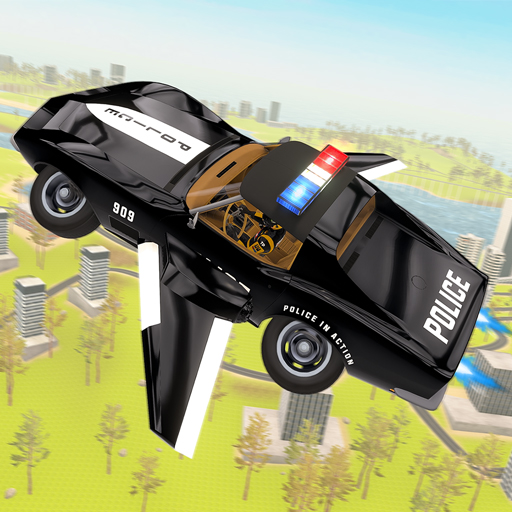
Flying Car Game Police Games
Flying Car Game Police Games Mods Game





























How To Play Flying Car Game Police Games
The core gameplay of Flying Car Game Police Games centers on mastering a vehicle that functions under two separate yet interconnected physics systems. On the road, the police cruiser behaves much like a traditional driving simulator, with throttle, braking, and steering handled through a standard keyboard layout. Players can roam city streets, weave through traffic and obstacles, and accumulate speed using the vehicle’s natural performance. The moment of transformation, however, is where the game truly shows its character. When flight mode is engaged, the car’s wheels fold away and thrusters ignite, enabling the vehicle to rise and travel through the sky. This mode is far more than a visual alteration; it completely reshapes the handling dynamics of the machine. Moving through the air demands careful attention to thrust, pitch, and directional controls. Pilots must learn to maintain the car’s orientation to avoid stalling or plunging nose-first into the ground. Executing aerial tricks, including flips and mid-air rotations, adds an extra level of complexity. These stunts often require starting a spin at the highest point of a leap or when flying sufficiently high, then expertly straightening the car before touching down to retain speed and prevent a wreck. The experience is further enriched by several interactive functions that improve both gameplay and mood. The police siren, triggered with a dedicated button, brings a thematic flavor, while the nitro boost supplies a brief surge of power for chasing down suspects or making bold getaways. In cases where control slips away or the vehicle ends up stuck in the environment, a reset option returns the car to a secure location. Furthermore, a shooting mechanic adds an action-oriented component, giving players a more direct way to interact with their surroundings. The entire control arrangement is built for smooth operation: W and S control acceleration and reverse, A and D manage steering, F switches between flying and landing modes, L-Shift activates the nitro boost, R resets the vehicle, H sounds the siren, the left mouse button fires, C locks or unlocks the cursor, P or Esc pauses the game, and I opens the instructions panel. Gaining full command of these inputs is vital, because the change from driving to flying can occur without warning, and a fast, accurate combination of actions often determines whether the result is a seamless transition or a destructive crash.
Flying Car Game Police Games Wiki
Overview
Flying Car Game Police Games offers a unique blend of traditional vehicle simulation and advanced aerial mechanics, placing players in command of a high-tech police craft that can shift fluidly between ground-based pursuits and open-air flight. This 3D driving experience redefines conventional ideas about movement by introducing a two-mode transport system that supports both rapid road travel and liberating aerial navigation. Set inside a large, three-dimensional urban landscape, the game invites players to control a vehicle that defies gravity, promoting inventive route planning, acrobatic maneuvers, and thorough investigation of vertical environments. By fusing the controlled handling of a police cruiser with the unrestricted nature of flying, this title occupies a distinct space within the driving genre. It attracts players who value diversity, providing not just a straightforward journey from one destination to another, but an open-ended arena where the sky is just as traversable as the highway. The primary strength of the experience is its focus on player agency: whether dodging traffic with the siren active, speeding off elevated ramps to complete mid-air rotations, or gliding above the skyline to inspect the surroundings, the gameplay consistently showcases the adaptability of the central vehicle. This overview will outline the game's core systems, standout qualities, and useful advice for both newcomers and experienced users who wish to maximize their use of this hybrid flying car.
Key Features
The title sets itself apart through a set of interconnected features that form a unified and compelling experience. Chief among these is the combination of flying and driving, a dual-action movement system that enables smooth switching between street navigation and airborne control. This is not merely a basic toggle; rather, it is a comprehensive mechanism that expands movement into the vertical dimension, enabling players to bypass barriers, ascend structures, and reach roofs and other elevated zones that cannot be accessed by vehicle alone. This mechanic encourages experimentation, allowing users to change modes mid-motion and string together dynamic sequences such as accelerating off a ramp, engaging flight, and continuing through the air. Adding to this is the focus on aerial tricks and exploration. The game provides a setting that prizes bold stunts; performing rolls and leaps is not simply flashy, but also functions as a useful way to alter positioning, add elevation, or execute polished landings. The open 3D metropolitan setting acts as its own playground, offering a rich urban terrain complete with thoroughfares, broad plazas, and towering buildings that push players to discover alternate pathways and evaluate the boundaries of the flying car's performance. The futuristic police automobile itself is another defining characteristic, featuring a sleek, advanced aesthetic and providing more than just the ability to fly. Its built-in warning siren contributes an authentic enforcement mood, while the nitro boost feature adds an extra level of speed control to the gameplay. The capacity to use weapons introduces an action-arcade component, setting it apart from pure simulation and giving players a way to influence the world or engage in target practice. Finally, the control layout is built to remain approachable yet still offer complexity, featuring a broad set of key bindings that let skilled players perform complicated movements once they gain experience. For dedicated gaming fans, the true attraction is the combination of these components: the excitement of commanding a car that defies normal physics, the fulfillment of learning a detailed control system, and the countless opportunities for inventive discovery inside a thoughtfully designed 3D world.
Precautions/Tips
To fully enjoy and excel in Flying Car Game Police Games, players should handle its systems with intention and preparation. First, patience is essential when learning the shift between driving and flying. The aerial controls are very responsive, and it is easy to oversteer. Beginners should train in spacious locations, far from structures and barriers, to become familiar with the vehicle's momentum and turning behavior in flight. Make liberal use of the reset key (R) during the early stages; it is much more practical to restore a flipped or stuck vehicle than to fight with an awkward angle. When getting ready for takeoff, it is often helpful to use a ramp or a slight upward slope to gain initial height, which cuts down on the time required to reach steady flight. On the other hand, while landing, aim for a smooth and level descent, pulling back on the throttle before touching down to prevent bouncing or crashing. The nitro boost (L-Shift) is a high-stakes, high-payout tool. Although it offers a notable increase in speed, it also makes steering harder, particularly on tight roads or during airborne movement. Employ nitro mainly on open straightaways or when a rapid burst is needed to clear a wide gap. The police siren (H) is a nice atmospheric touch, but it does not influence actual gameplay; activate it for personal enjoyment rather than relying on it for any functional edge. The shooting function (Left Mouse) allows interaction with the environment, but note that it may not change the behavior of regular traffic or obstacles, so avoid treating it as your main way to clear a route. Additionally, players should not neglect the instruction manual (I) or the pause menu (P/Esc). Reviewing all available settings and commands can uncover useful features or tweaks that improve performance. In short, the path to proficiency is constant experimentation and a readiness to gain insight from every mistake. Treat every flight as an experiment, sharpen your control and timing, and soon the airspace will feel just as natural as the streets.
Flying Car Game Police Games Frequently Asked Questions
Q: What exactly is Flying Car Game Police Games?
A: Flying Car Game Police Games represents a 3D driving simulator that merges police vehicle chases with advanced aerial flight systems. In this experience, you take command of a specialized law-enforcement car that is able to travel along roadways and also soar through the sky.
Q: What does the core gameplay of Flying Car Game Police Games involve?
A: The primary gameplay centers on piloting a police automobile capable of standard ground movement as well as switching to aerial mode for sky traversal. Within the expansive 3D city, you can roam freely, execute acrobatic maneuvers, dodge obstructions, and make use of an array of vehicle abilities.
Q: What are the controls for the vehicle in Flying Car Game Police Games?
A: The control scheme is as follows:
- W / S: Accelerate and reverse
- A / D: Steer left and right
- F: Toggle between airborne and grounded modes
- L-Shift: Engage nitro boost
- R: Reset the car
- H: Activate the police siren
- Mouse Left: Discharge weapon
- C: Lock or free the cursor
- P / Esc: Pause the action
- I: Display instructions
Q: Is it possible to make the car fly?
A: Absolutely. Pressing the F key activates flight mode, letting the vehicle lift off from the ground and cruise through the air. This capability allows you to clear obstacles and access elevated zones that are otherwise unreachable.
Q: What actions are available while the car is airborne?
A: Once airborne, you can pull off aerial tricks like flips and mid-air leaps. Additionally, you can discover alternate paths that are inaccessible during standard ground travel, and it is essential to regulate your velocity and heading to achieve a gentle touchdown.
Q: Which standout characteristics define Flying Car Game Police Games?
A: The key features include:
- Combined ground and flight movement: seamless switching between road and sky travel.
- Aerial stunts and exploration: perform flips, jumps, and uncover hidden routes.
- Advanced police car: a futuristic vehicle equipped with flight systems, siren, and weaponry.
- 3D urban landscape: a richly detailed open world built for both surface and airborne navigation.
Q: Does the game include a police siren?
A: Indeed, the siren can be switched on by hitting the H key.
Q: Is there a weapon-firing option available?
A: Yes, discharging your weapon is done with the left mouse button.
Q: What should you do if the vehicle becomes stuck?
A: Simply press the R key to restore the car to its default state.
Q: What is the method for pausing the gameplay?
A: To pause, use either the P key or the Escape (Esc) key.
Q: How can the in-game instructions be brought up?
A: Hit the I key to display the instruction overlay.
Q: Which type of vehicle is under the player's command?
A: You control an advanced police cruiser outfitted with flying capabilities, a siren, and a shooting mechanism.
Q: Can you describe the game world?
A: The action unfolds in a meticulously crafted 3D city featuring wide-open spaces intended for both road driving and aerial flight.
Q: Would Flying Car Game Police Games be classified as a racing title?
A: It is a driving simulator that blends police chase elements with airborne mechanics. Instead of conventional racing, the emphasis is placed on free exploration, performing stunts, and mastering vehicle handling.
Q: How does the nitro boost function benefit the player?
A: The nitro boost, engaged via the L-Shift key, grants a temporary surge of acceleration that is advantageous for rapid road travel or swift aerial movements.